


Hangman
4.611.32K Reviews
App Specs
- Version
- 6.0.62
- Updated On
- License
- Free
- Downloads
- 50,000,000+
- Developer
- Senior Games
- Categories
- Word
- Platform
- Android, iOS
Screenshots
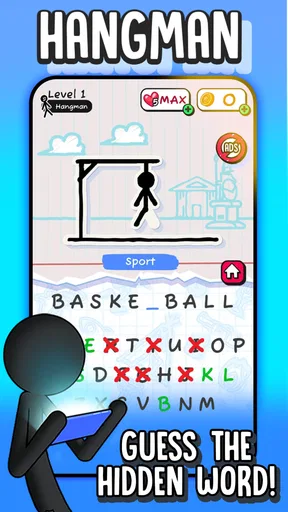
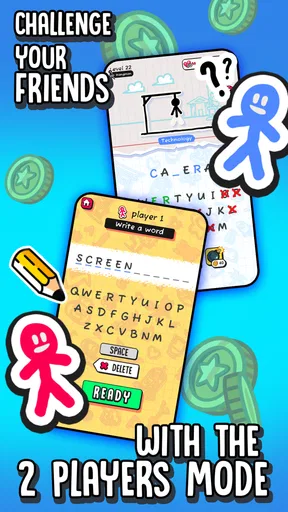

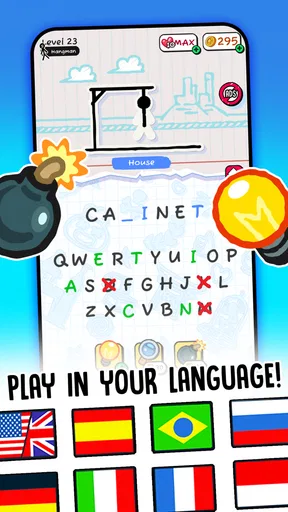
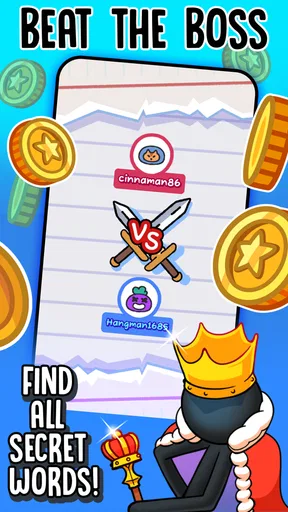
 Analysis by AppCompare
When it comes to classic word games that can be both educational and entertaining, Hangman is a timeless favorite. I recently got my hands on the mobile version of this beloved game, and let me tell you, it’s a delightful throwback to those simpler times when all you needed was a pen, paper, and a friend to challenge. But how does this app stack up in the world of digital gaming? Let’s dive in!
A quick game for the gaps in the day
I find Hangman easiest to enjoy in short stretches rather than as the main event of a long gaming session. It suits a quiet wait, a break between tasks, or a relaxed moment when I want to focus on one small puzzle without learning a complicated control scheme. Because each round centers on a hidden word, I can give it my attention, make a few guesses, and put it aside when something else needs me.
A useful way to play is to slow down before tapping a letter. I look at the word’s length, consider the category, and try common letters before reaching for a guess that feels clever but is unlikely. That small habit makes the game more satisfying and can help avoid careless mistakes. It also turns a quick round into a little exercise in pattern recognition, rather than a string of random taps.
The Nostalgic Appeal
Right from the get-go, the Hangman app taps into that nostalgia factor. Remember those school days when you’d sneak in a quick game during recess or lunch? Well, this app brings that experience to the palm of your hand. The interface is clean and straightforward, making it super easy to jump right into a game without any fuss. The design mimics the chalkboard style with a modern twist, which is a nice touch that pulls on the heartstrings of those retro vibes.
Gameplay and Features
So, what’s the gameplay like? If you’re familiar with the traditional version, you’ll feel right at home. You start by selecting a category, which can range from animals to movies, and then you're off to guess the hidden word. With each wrong guess, your little stick figure gets closer to an untimely end. It’s simple, yet surprisingly addictive.
One feature I particularly liked was the option to play against friends. You can send challenges and see who’s the better wordsmith. There’s also a leaderboard, adding a competitive edge to the game. Plus, if you’re someone who loves a good challenge, the app offers different difficulty levels. Trust me, the ‘Expert’ mode is not for the faint-hearted!
Playing with someone else, or just yourself
The friend challenges give the familiar guessing format a social use that paper-and-pencil play already does well: you can make a small contest out of a spare moment. I would use that option when both players want a quick, low-pressure activity, not as a substitute for a live conversation or a full multiplayer game. A leaderboard can add a reason to return, but players who dislike comparing scores may find that part easy to ignore.
Worth Reading Before You Choose

Flipboard Shows What News Apps Must Do Beyond the Feed

Switching to Android Auto Means Rethinking Your Driving Routine

Google Calendar Makes a Crowded Week Easier to Manage

Ludo King Makes the Most of the Minutes Between Plans

Baby Panda World Brings Quick Play to Modern Phones, but Its Game Library Feels Busy

ESPN’s Live Game View Makes Following Close Games Easier
For solo play, category choice is more than a cosmetic detail. If I am tired, a familiar subject can make a round feel approachable; if I want to stretch myself, a less familiar category makes the clues harder to predict. A practical compromise is to switch categories from time to time instead of settling into one comfortable pattern. That keeps the guessing from becoming automatic, while still letting me choose a topic that fits my mood.
Compared with a crossword or a word-search game, Hangman asks for fewer ongoing commitments: I do not have to scan a large grid or work through several crossing clues. Compared with a broad word puzzle collection, it is more focused and easier to pick up, but it also has less variety in the basic task. I would choose it for quick letter-by-letter deduction, and choose a crossword when I want a longer puzzle with several kinds of clues and a stronger sense of progression.
Educational Twist
Hangman isn’t just about fun; it’s also a sneaky way to improve your vocabulary. The app includes a vast array of words, some of which might send you running to Google for a quick definition. It’s a great way to learn new words and their spellings, making it a hit for both kids and adults looking to brush up on their language skills.
For learning, I get more from the game when I treat an unfamiliar answer as a prompt to look up its meaning after the round, rather than assuming that guessing the spelling means I have learned the word. That makes it useful as a light supplement to reading or language practice, especially for someone who enjoys discovering words through play. It is not a structured lesson, though, so a learner who needs explanations, themed vocabulary instruction, or a clear study plan will be better served by a dedicated language-learning tool.
Who will enjoy it, and who may want something else
I would recommend this style of play to people who like word puzzles but do not always have the time or patience for a longer challenge. It can also work for families looking for a simple turn-taking game, provided the players are comfortable with the same language and the chosen category. The Everyone content rating makes it broadly suitable from an age-rating perspective, but younger players may still benefit from an adult nearby when an unfamiliar word leads to a conversation about what it means.
On the other hand, I would skip it if I wanted a deep solo campaign, elaborate strategy, or a puzzle that changes its core rules from round to round. Hangman’s appeal is its simplicity, and that same simplicity can become repetitive if I play for too long. Expert difficulty may appeal to someone seeking a tougher guessing challenge, but it does not turn the game into a different genre. If variety matters more than the classic format, another word game with multiple puzzle types is likely a better fit.
User Experience
The user experience is smooth. No unnecessary ads popping up every few seconds, which is a huge relief. The app maintains a good balance between being free-to-play and offering in-app purchases for those who might want to unlock extra features or remove ads entirely. The developers have done a great job ensuring that even the free version is enjoyable and not bogged down by constant interruptions.
For a clearer sense of what the free-to-play choice means, the game is free to download, while optional in-app purchases range from $0.49 to $30.99 per item. I would begin without spending and decide only after seeing whether I play often enough to value an extra purchase. If I am helping a child use the game, I would also make the purchase decision myself rather than treating optional spending as part of the puzzle. The developer is Senior Games, and the current version is 6.0.60; that identifies the version available now, but it is not by itself a reason to expect a particular feature or future change.
What its current version means for existing players
The game was released on April 26, 2018, and its current version, 6.0.60, shows that it has continued to receive version changes since its debut. I would read that as a reason to check that my installed copy is current when something behaves unexpectedly, not as proof that the underlying game has been reinvented. For an established player, the important question is whether the familiar word-guessing loop remains enjoyable; for someone new, the version number is less useful than trying a few rounds and seeing whether the pace fits.
Hangman has an average rating of 4.6 from around 610,000 ratings, with roughly 11,000 written reviews and over 50 million installs. Those figures suggest that many people have tried it, but they cannot tell me whether its difficulty, categories, or social play will suit my own preferences. I would treat popularity as context, then judge the game by the actual experience: whether I like the clues, whether the rounds feel fair, and whether I want another attempt after a mistake.
The minimum operating-system requirement is 7.1, which is useful to check before installing on an older device. If the game is intended for a shared family device, I would also consider who will be playing and whether a quick, simple word game is a good fit for everyone. The broad age rating is reassuring for general suitability, while the actual vocabulary and challenge can still vary from round to round.
Some Final Thoughts
In a world filled with complex, high-octane games, Hangman is a refreshing change of pace. It’s perfect for those moments when you need a quick mental escape or a fun way to kill time. Whether you’re a fan of word games or just looking for something simple to pass the time, this app is definitely worth a download. It’s a classic reborn in the digital age, and it captures the essence of what made the original so much fun.
What I would watch for as a player is whether the categories and challenge continue to hold my interest, rather than assuming that a version number promises a particular direction. If I start to guess by habit, changing topics or taking a break is a better fix than forcing longer sessions. If I want more depth, I would move to another puzzle format; if I want the quick logic of filling in a word one letter at a time, this remains a pleasing fit.
I’d say give it a go. Whether you’re reliving your childhood or discovering it for the first time, Hangman offers a delightful mix of nostalgia and brain-teasing entertainment. Happy word hunting!
Pros
- Simple and intuitive interface.
- Wide range of word categories.
- Offline play available.
- Multiplayer mode included.
- Suitable for all ages.
Cons
- Limited hint options.
- Repetitive word lists.
- Ads can be intrusive.
- No custom word option.
- Graphics are basic.
FAQs for Hangman
What features does the Hangman app offer?
The Hangman app provides a classic word-guessing game experience, complete with various difficulty levels to challenge both beginners and experts. It includes a vast dictionary of words, hints to assist players, and a user-friendly interface. Additionally, users can enjoy customizable themes and track their progress with built-in statistics.
Is the Hangman app suitable for all ages?
Yes, the Hangman app is designed to be family-friendly and suitable for all age groups. It includes a child-friendly mode with simpler words for younger players, while also offering more challenging words for adults. Parents can rest easy knowing there are no inappropriate ads or content in the app.
Does the app require an internet connection to play?
The Hangman app can be played offline, making it perfect for users on the go or in areas with limited internet access. However, some features, such as updating the word list or accessing leaderboards, may require an internet connection. This ensures a seamless gaming experience anywhere, anytime.
Are there any in-app purchases or ads in the Hangman app?
The app is free to download, but it does contain ads that support the developers. Users have the option to remove ads through a one-time in-app purchase. Additionally, there are optional purchases for premium themes and extra hint packs, but these are not necessary to enjoy the full game experience.
How does the app handle user data and privacy?
The Hangman app prioritizes user privacy and complies with all relevant data protection regulations. It collects minimal data necessary for app functionality, such as gameplay statistics, which are stored securely and never shared with third parties. Users can review the privacy policy within the app for more details.


